
This is a write-up of my talk at the April 2026 edition of BrightonSEO on technical SEO traps to watch out for in ecommerce migrations.
The talk idea came off the back of a real-world experience with a client in the music industry who were migrating their online shop from WooCommerce to Shopify.
The artist in question was under a record label which had followed the same suit a little while earlier, and while it seemed like a straightforward replatforming project (he says as he winks slowly), there were a few unexpected nuances and pitfalls (alongside usual migration fun) that came about as part of the technical and infrastructure set-up of the artist and label respectively.
You can see the full deck here. If you were a ticket holder to this edition of BrightonSEO, you’ll also be able to watch the full recorded presentation of the talk too.
Keep an eye on their YouTube channel in the meantime too, as who knows, it might pop up there in the future at some point.
What Traps Should I Avoid In Ecommerce Migrations, Then?
There are many, dear reader.
But in this case study, I outlined a few “bigger issues” that were inherent to this project specifically, which I hope gave viewers of my talk pause for thought if they were to ever approach a replatforming project with a similar set-up.
There were a number of considerations around the two platforms and their set-ups specifically – how they handled content on PDPs, differences in URL structure etc – but the hook of the presentation was around the shared inventory of the artist site and the label site and how this caused some unexpected mayhem.
The talk opened with a few punchy bits on the importance of migrations in ecommerce ($$$$$) and some copium-induced tidbits and made-up quotes about how we, as SEOs, are so often left out at such crucial times and are left to tidy up whatever mess has befallen the site in question following a migration.
See indexed staging sites, the assumption that we “just do redirects” and “SEO won’t be affected when we change CMS”. Familiar sounds to many of us.
I made no secret about the wealth of resources on ecommerce migration checklists and guidelines available on the web to help prime businesses and SEO consultants ahead of these projects.
More importantly, I retained the classic adage that no migration is ever the same, and we are continually learning through experience on these.
I’ll dive in on the finer, unique points and “traps” of this migration project specifically now.
Issue 1: Platform Constraints and URL Structure
The key focal point here is that in this set-up, and in many WooCommerce setups, WooCommerce gives you a lot of flexibility over URL nomenclature.
Your product URLs can follow whatever path structure makes sense for your site architecture: /music/vinyl/name-of-product/, /artist/vinyl/name-of-product/, /shop/artist/name-of-product/. You can configure /product/ and /product-category/ prefixes, or remove them entirely.
Shopify, straight out of the box, is more fixed.
Products live under /products/, collections under /collections/, blog content under /blogs/. This is largely fixed without workarounds (of which there are many, of course).
This means that for most WooCommerce-to-Shopify migrations, the redirect work starts from a position of structural mismatch rather than a clean path rename.
A Redirect Problem That Scales Fast
The first pass at a redirect file for this migration came back with thousands of 1-to-1 mappings. That’s fine if every legacy URL is clean and predictable. But in practice, they weren’t.
For a product like /limited-edition-vinyl/, the real-world URL variants that needed capturing included:
/music/vinyl/limited-edition-vinyl//shop/vinyl/limited-edition-vinyl//records/limited-edition-vinyl//artist/vinyl/limited-edition-vinyl//shop/limited-edition-vinyl//store/limited-edition-vinyl//product/limited-edition-vinyl/?utm_source=instagram/Product/limited-edition-vinyl/(capitalisation variants)/PRODUCT/limited-edition-vinyl/
Not all of these were indexed. But some were in backlinks, some in email campaigns, some in social posts. Accounting for all of them in a manual redirect file wasn’t realistic.
The Solution: a Catch-All Regex/Wildcard Redirect
The approach we landed on was a wildcard/regex pattern living at the server or CDN layer, not inside Shopify, which doesn’t give you that level of redirect control.
For Apache (.htaccess, CDN layer only):
RewriteEngine On
RewriteCond %{REQUEST_URI} ^/.*/([^/]+)/?$
RewriteRule ^.*$ /product/%1 [R=301,L]
For Nginx:
^/.*/([^/]+)/?$
Redirect target: /product/$1
Breaking down what this does:
^/anchors to the start of the path.*/matches any number of folder levels — so it doesn’t matter if the URL was/shop/,/music/vinyl/, or/artist/records/limited-edition/([^/]+)captures the final segment (the product slug)/?$makes the trailing slash optional- The redirect target drops that captured slug straight into
/product/
This enabled us to handle thousands of legacy redirects. Joy.
However, there are a few risks worth flagging with this approach, given its bluntness:
- Over-matching: the catch-all grabs any URL with multiple path segments, including category pages, blog posts, and search results. Non-product URLs end up redirected to
/product/incorrectly. - Redirect chains: if Shopify already has its own redirect logic in place, you can end up stacking redirects.
- Pagination: tends to break silently. Worth explicitly testing after go-live.
- Infrastructure dependency: this whole approach requires the old WooCommerce server or CDN edge to still be active.
Issue 2: Accidental Duplicate Inventories
And now we come the crux of what made this project so fun. This issue, at least in my experience, isn’t common at all, which is why it foxed me so.
That said, given it was inherent within the e-store setup of a very well-known musician and a very well-known record label, this did make me question this assumption. Indeed, I even had one or two people come up to me after the talk to confirm they’d seen similar oddities in the wild, too. Do watch out, kids.
The underlying pattern here was that the parent site (the record label) and the child site (the artist estore) shared a database and inventory setup in the backend.
Here’s an image from my talk (the only AI-generated asset from the session, I hasten to add) that tries to visualise this:
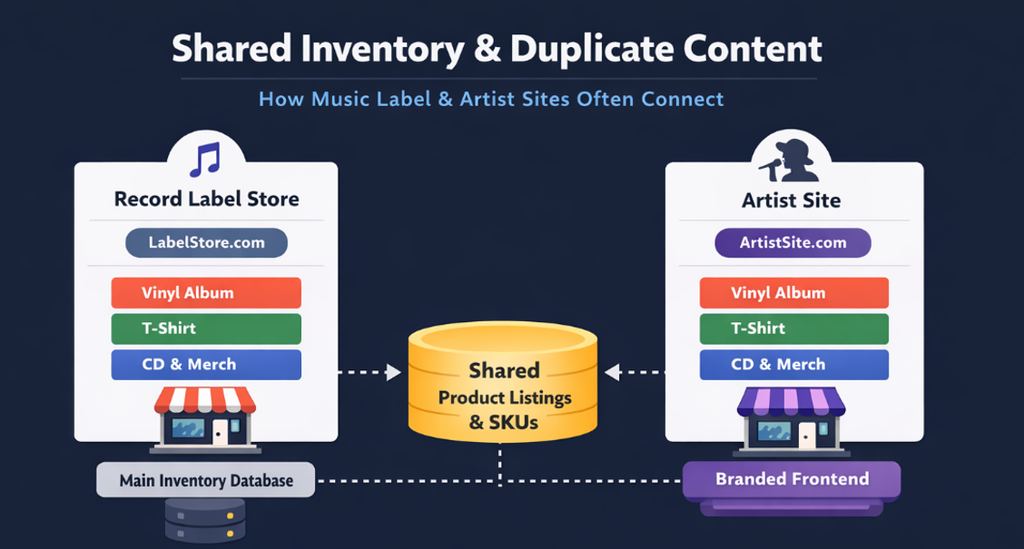
This effectively meant that all the individual artist product pages that lived under the parent label site (and the one I was working on was one of quite a few others under this label) were duplicated in the backend, and, astonishingly, were carried over into the Shopify instance of the individual artist site I was migrating over from WooCommerce.
In short, this meant that when the individual artist store was migrated over to the new Shopify site, it also pulled in everything else from the parent site too, given the shared inventory in the backend.
The result:
- Same SKUs live on both the parent label site and the artist’s site
- Same product pages, same product IDs, canonicals pointing in different directions
- Indexation stats that told a very messy story
And of course, simply removing the offending other-artist pages carried over from the parent site wasn’t an option, as this would mean the same result on the actual label site itself.
I was told in no uncertain terms that the “label store is the artist store” and vice versa.
The Solution: Noindex, Sitemap Cleanup, URL Removal Requests
With outright deletion off the table, the remediation process was somewhat more involved:
- Noindex the duplicate product pages on the artist store that were competing with the parent label site
- Sitemap cleanups removing those pages from the XML sitemap
- URL removal requests via Google Search Console to accelerate the de-indexing of already-indexed duplicate URLs
- Canonical clean-up to ensure the signals pointing to the parent site’s versions were unambiguous
This worked, eventually. But it took longer than it should have because it wasn’t identified as a risk during pre-migration scoping.
I’m not wholly sure what my takeaway is here, aside from “try and be mindful that there might be a chance that a site shares a product database with another domain…”
Issue 3: Content Parity Mismatches
“Content parity will just port over” was one of the opening “we’ve all heard this one before as SEOs” reassurances I made early on in the talk.
It was a key component of this migration however, and one that really needs to be driven home when considering moving from a popular ecommerce CMS to another.
The obvious headache? Template differences. WooCommerce and Shopify product pages are, surprisingly, a little different. This can cause content signal mismatching, differences in semantic depth, descriptions, images, related product taxonomies and so on.
Here are a few summaries of these differences from the talk:
| Area | WooCommerce | Shopify | Migration Risk |
| Related Products | Taxonomy-driven (categories, tags) | Collection-driven | Changes product clustering signals |
| Cross-Sells/Up-Sells | Native + plugin-enhanced | Often app-based or manual | Potential reduction in contextual linking |
| Breadcrumb Structure | True hierarchical depth | Collection-based hierarchy | Alters perceived site architecture |
Page Titles Getting Left Behind
One of the most avoidable content parity issues I see are duplicate page titles across the entire site post-launch.
This happens when the Shopify theme’s default title template, usually pulling from the store name or a single meta field, hasn’t been properly configured before go-live. Every collection, every product page, and the homepage all end up with the same title.
This can be easily avoided by checking page titles across a crawl of the staging environment before you launch.
Structured Data
Schema in WooCommerce doesn’t carry over to Shopify automatically.
What the new theme and apps provide out of the box may be less complete, or structured differently enough to cause validation warnings.
Faceted Navigation and Crawl Traps
Faceted navigation is where a lot of migrations quietly unravel. In WooCommerce you’ve got taxonomy-based filters: structured, crawlable, with plugin-level control.
Out of the box, Shopify deals in parameter-based or app-driven filters. These can generate combinational URLs at scale.
I’ve summarised the key differences and risks here in the table below:
| Area | What Changes | SEO Risk |
| Filter URL Structure | Woo taxonomy-based filters vs Shopify parameter/app-based filters | Crawl expansion & index bloat |
| Duplicate Listings | Same products accessible via multiple filter combinations | Split ranking signals |
| Crawl Traps | Combinational URLs generated at scale | Wasted crawl budget |
| Canonical Control | Less granular control in Shopify vs Woo plugins | Harder duplicate suppression |
A Few More Areas That Deserve Attention
I’ve listed a few other core considerations that were vital to this project’s success.
The question of “what traps do I need to consider when approaching an ecommerce CMS migration” may return the cliched answer “it depends” or “how long is a piece of string”. But in reality, this is where the online guides and checklists fall down.
I’ll say it again: no two migrations are ever the same.
JavaScript Rendering Mismatches
JavaScript rendering is one that catches people off guard because the site looks fine in a browser. However, if your new platform relies heavily on client-side rendering for product content, pricing, or reviews, you may have just made a chunk of your content invisible to crawlers without realising it.
This is particularly relevant when moving to a Shopify theme that leans on JavaScript frameworks for product page hydration. Run a crawl with rendered and non-rendered comparisons. Check what’s actually visible in the raw HTML response versus what appears after JS executes.
Hreflang Breaking in Multi-Region Stores
If you’re running multi-region or multi-language stores, hreflang can easily break during a migration. URL structures change, and the return tags stop pointing anywhere valid.
As always, audit every hreflang tag on staging.
Reframing Migrations as Architectural Projects
I talk about this concept a lot in my ongoing work and whenever I’m able to grace the stage at other industry conferences in general; the fact that SEO needs to be consistently reframed as a core component of any business decision involving a website in general.
Migrations are a fantastic opportunity for SEO consultants to affirm this, and a great arena for business owners and broader marketing practitioners to get more clued up on this view in general.
Looking at migrations specifically, they tend to be treated as technical delivery projects with an SEO checklist bolted on at the end. The outcomes are better when they’re treated as architectural SEO projects from the start where the SEO practitioner is in the room during platform selection, URL structure decisions, and theme/template choices, not handed a brief three weeks before launch and asked to “sign off”.
This reframing also changes how risk gets managed. If SEO is an input rather than a QA gate, the migration team asks different questions earlier: What does our redirect complexity actually look like? How does this platform handle faceted navigation? What schema does the theme ship with? Do we share product IDs with any other domain? (god forbid).
Takeaways for Agencies and In-House Teams
Embed SEO early. The earlier SEO is involved, the more options exist for mitigating risk. Once a platform has been selected and a launch date has been set, you’re working within constraints rather than informing them.
Build internal expertise around platform-specific SEO. WooCommerce SEO knowledge and Shopify SEO knowledge overlap but don’t map onto each other. If you’re recommending or delivering a Shopify migration, know what Shopify can and can’t do natively.
Learn from each migration. No two are the same. The patterns repeat, but the specific mix of risks is always different. Document what you find during and after each migration; it makes the next one faster and reduces the cost of the inevitable surprises. I’ve done so many of these over my 15 year career and each one presents a new learning opportunity.
Monitor after launch. Go-live isn’t the end. Set up Search Console alerts, track crawl stats weekly for the first month, and have a clear escalation path if indexation drops sharply in the first few weeks.
Thanks for reading. And thanks for catching my talk at BrightonSEO in April 2026 if you were able to.